

Cadence—a private, local AI writing studio
Cadence—a private, local AI writing studio
An experimental tool designed to help me write more frequently—to find my writing cadence.
An experimental tool designed to help me write more frequently—to find my writing cadence.
Project Type
experimental
Tags
writing • AI tools • desktop app
Roles
creator
Association
Creative Technologist
at
Pixel Uiz
in
2026
The old way
I used to write drafts directly in Medium, where I publish. Later, I moved to Notion so I could better-organize my drafts with tags and a kanban view to track how far along they were—stages like idea, draft, review, published. That helped, but I still wanted to speed up the process and make it less mentally draining so I'd be more likely to finish and publish more often. I tried using Notion's AI tool to help, but found it too imbalanced for what I wanted. I could either have it draft entire articles by writing for me -or- rewrite whatever I had selected without me able to review the rewrite first. It's sort of all or nothing. There also wasn't an easy way to track edits or just have a conversation so I could just get feedback and then consider what to change from there. Alternatively, other AI tools just tend to be long-running conversations that just perpetually stack replies in an ever-growing thread. That's not entirely helpful either. I also wanted to leverage my own hardware to run local models to avoid being dependent on cloud infrastructure and data centers. I decided to come up with my own solution instead.
The old way
I used to write drafts directly in Medium, where I publish. Later, I moved to Notion so I could better-organize my drafts with tags and a kanban view to track how far along they were—stages like idea, draft, review, published. That helped, but I still wanted to speed up the process and make it less mentally draining so I'd be more likely to finish and publish more often. I tried using Notion's AI tool to help, but found it too imbalanced for what I wanted. I could either have it draft entire articles by writing for me -or- rewrite whatever I had selected without me able to review the rewrite first. It's sort of all or nothing. There also wasn't an easy way to track edits or just have a conversation so I could just get feedback and then consider what to change from there. Alternatively, other AI tools just tend to be long-running conversations that just perpetually stack replies in an ever-growing thread. That's not entirely helpful either. I also wanted to leverage my own hardware to run local models to avoid being dependent on cloud infrastructure and data centers. I decided to come up with my own solution instead.
The old way
I used to write drafts directly in Medium, where I publish. Later, I moved to Notion so I could better-organize my drafts with tags and a kanban view to track how far along they were—stages like idea, draft, review, published. That helped, but I still wanted to speed up the process and make it less mentally draining so I'd be more likely to finish and publish more often. I tried using Notion's AI tool to help, but found it too imbalanced for what I wanted. I could either have it draft entire articles by writing for me -or- rewrite whatever I had selected without me able to review the rewrite first. It's sort of all or nothing. There also wasn't an easy way to track edits or just have a conversation so I could just get feedback and then consider what to change from there. Alternatively, other AI tools just tend to be long-running conversations that just perpetually stack replies in an ever-growing thread. That's not entirely helpful either. I also wanted to leverage my own hardware to run local models to avoid being dependent on cloud infrastructure and data centers. I decided to come up with my own solution instead.
Goals & Priorities
My primary goal is to write more often. Reducing mental overhead for writing should encourage me to keep the pace and follow through until an idea becomes a published article. Beyond that, tracking what I've written, what I'm working on, and ideas for future writing is table stakes to stay organized and focused.
Secondary goals include privacy, performance, and usability. Prioritizing local-first AI tooling not only supports privacy, but limits dependency on subscriptions and cloud-based services. However, it's necessary to run appropriate models for the task and the machine it's running on to keep RAM usage and wait times down to what feels reasonable. And finally, Cadence needs to feel at least as fluid and easy to use as other tools where I've used to encourage me to use it more.
In order of priority, these are the primary features Cadence needs:
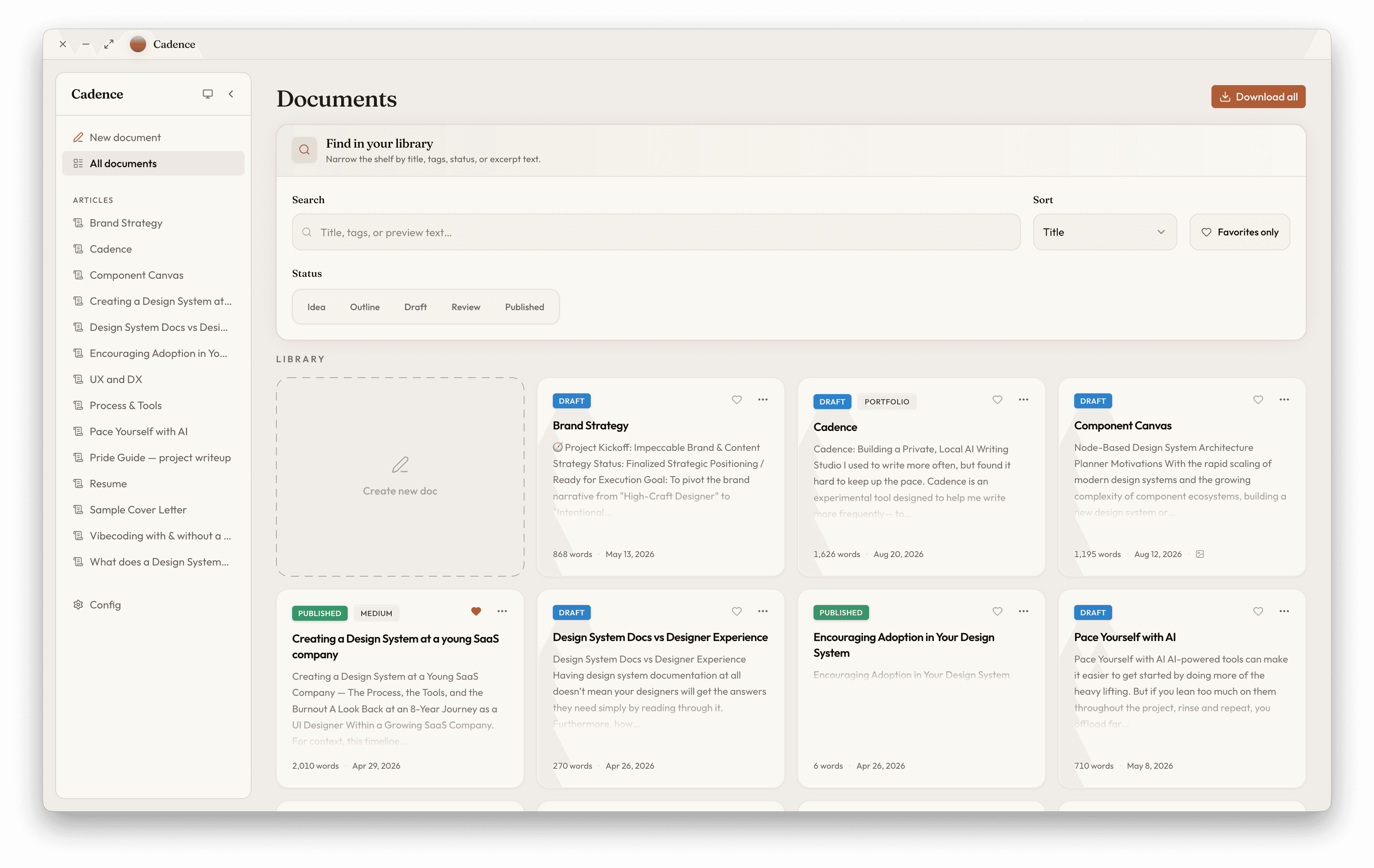
Library—document organization; view all docs, sort, tag, search, filter, etc
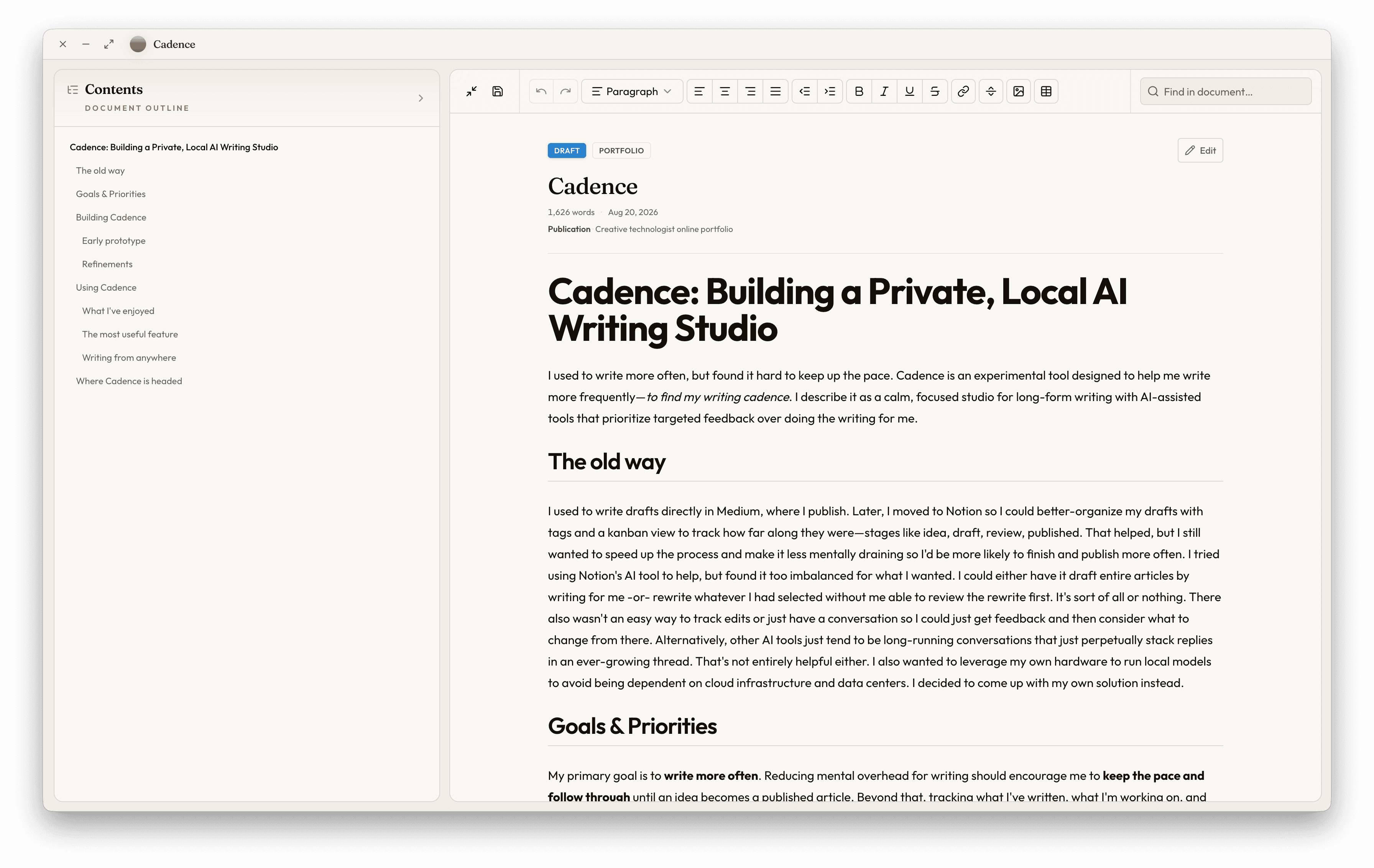
Editor—rich text editor with clean formatting and 'slash commands', similar to Notion.
AI-assisted tools—supportive tools that suggest edits and provide feedback without writing over the document. Suggest improvements; don't write for me.
Local AI support—prioritize running local models over cloud-based. Private. No subscriptions.
Goals & Priorities
My primary goal is to write more often. Reducing mental overhead for writing should encourage me to keep the pace and follow through until an idea becomes a published article. Beyond that, tracking what I've written, what I'm working on, and ideas for future writing is table stakes to stay organized and focused.
Secondary goals include privacy, performance, and usability. Prioritizing local-first AI tooling not only supports privacy, but limits dependency on subscriptions and cloud-based services. However, it's necessary to run appropriate models for the task and the machine it's running on to keep RAM usage and wait times down to what feels reasonable. And finally, Cadence needs to feel at least as fluid and easy to use as other tools where I've used to encourage me to use it more.
In order of priority, these are the primary features Cadence needs:
Library—document organization; view all docs, sort, tag, search, filter, etc
Editor—rich text editor with clean formatting and 'slash commands', similar to Notion.
AI-assisted tools—supportive tools that suggest edits and provide feedback without writing over the document. Suggest improvements; don't write for me.
Local AI support—prioritize running local models over cloud-based. Private. No subscriptions.
Goals & Priorities
My primary goal is to write more often. Reducing mental overhead for writing should encourage me to keep the pace and follow through until an idea becomes a published article. Beyond that, tracking what I've written, what I'm working on, and ideas for future writing is table stakes to stay organized and focused.
Secondary goals include privacy, performance, and usability. Prioritizing local-first AI tooling not only supports privacy, but limits dependency on subscriptions and cloud-based services. However, it's necessary to run appropriate models for the task and the machine it's running on to keep RAM usage and wait times down to what feels reasonable. And finally, Cadence needs to feel at least as fluid and easy to use as other tools where I've used to encourage me to use it more.
In order of priority, these are the primary features Cadence needs:
Library—document organization; view all docs, sort, tag, search, filter, etc
Editor—rich text editor with clean formatting and 'slash commands', similar to Notion.
AI-assisted tools—supportive tools that suggest edits and provide feedback without writing over the document. Suggest improvements; don't write for me.
Local AI support—prioritize running local models over cloud-based. Private. No subscriptions.
Building Cadence
Early prototype
Initially, this was just an experiment for own personal use. I also hadn't previously built anything that incorporated AI, let alone connecting to local models. So I didn't spend time drafting a fine-tuned plan or UI concepts. I jumped straight into my IDE and wrote a prompt to kick off an agent, having a conversation about what I was interested in building based on my goals and priorities. Some core decisions were using React (web framework), shadcn/ui (UI framework), and Electron (desktop wrapper). Agents tend to prefer these due to their wide adoption and product maturity. A big advantage with React is the wider array of existing tools that could be incorporated, such as rich text editors to build off of vs starting from scratch. Shadcn/ui tends to be my go-to for most new projects as its baseline styling is already refined but easy to change, includes a healthy set of components that are easy to customize, and support for light and dark color themes are in place from the start. Electron is also the default choice for wrapping web-based code (React) into something that can standalone on a Mac instead of in the browser. I didn't stick with these tools in later versions, but it's where I started.
To my surprise, getting a working initial version went pretty quickly without much headache. Key screens include the Config page where I could set the API URL, API key, model name, local folder, and a few other details like temperature, max tokens, and timeout (stops waiting on the model after so many minutes in case it gets stuck). The editor also worked pretty well, with slash commands in place—if I typed / , a list of styles like H1-H3, paragraph, etc appeared in a popover for me to select from. The main issues were styling and the "Assist" panel (AI tools). For the styling, I used agent skills from Impeccable to draft a direction for the design language I wanted to use. It asked me several questions about the purpose of the app, audience, etc. Then it drafted documentation that set the tone for product's design from there. Key decisions included a soft color palette with warm tones, modern simplicity, and a serif/sans-serif typeface pairing for the branding. From there, I hand-picked more intentional typefaces from Google Fonts; mainly to get a bit more personality from the serif display font that felt more on-trend for 2026.
Refinements
With the a functional baseline prototype working properly and a general style guide in place to help drive visual design decisions, I started adding and refining UI details. Smooth transitions on panels and their contents when they expand or collapse. Consistent type treatment. Information architecture, especially within the Assist panel where there was a lot of opportunity to clarify what the AI model was doing while it ran, among other details.
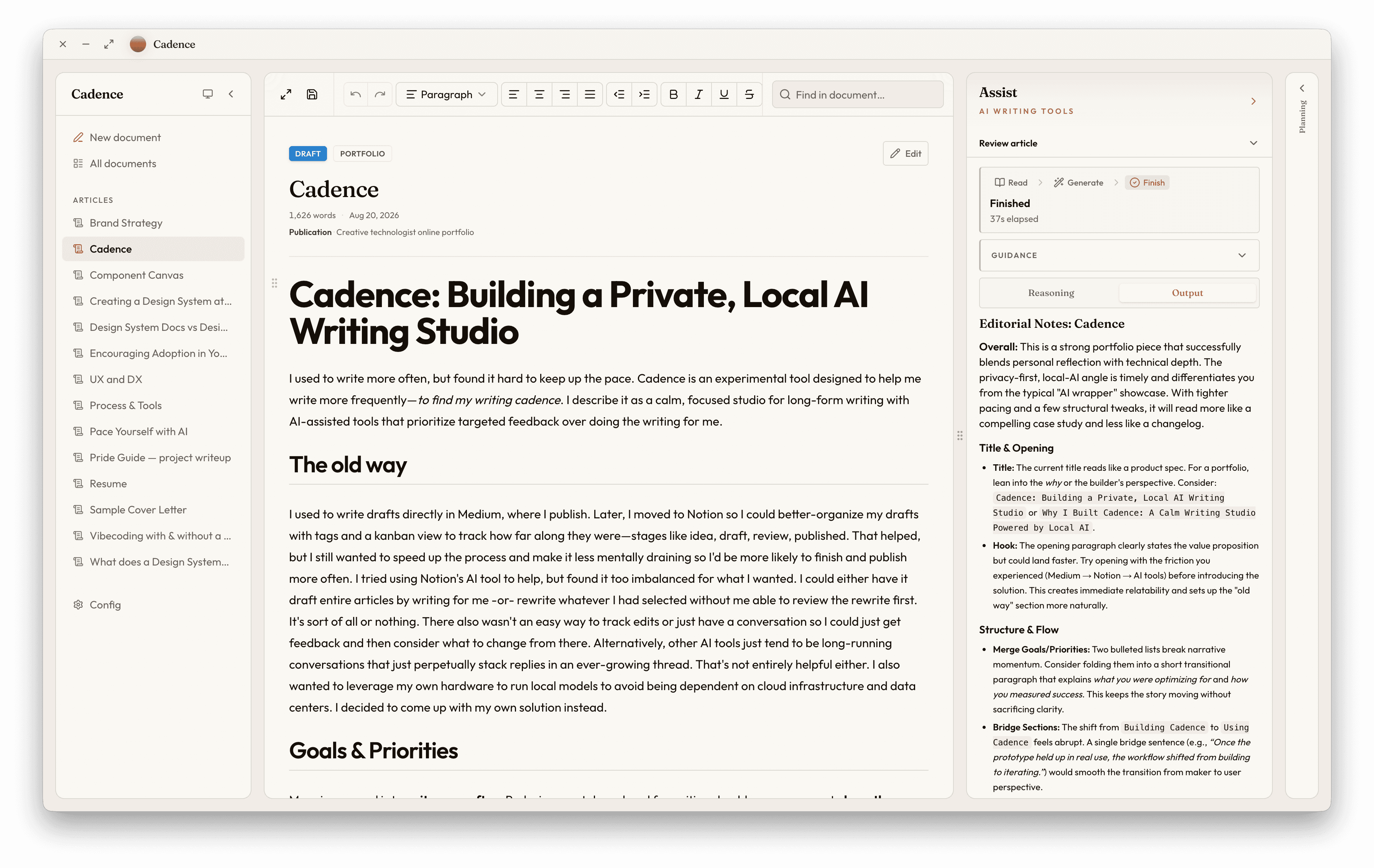
While testing, I also added more AI tools; mainly a Review article preset. The idea was to have the agent review the document and either make targeted recommendations from a provided list or suggest anything it thought worth mentioning. It would also intake custom instructions for more focused context and even generate a checklist list to help me track what needed attention. Once the prototype held up in real use, the workflow shifted from building to iterating.”
Building Cadence
Early prototype
Initially, this was just an experiment for own personal use. I also hadn't previously built anything that incorporated AI, let alone connecting to local models. So I didn't spend time drafting a fine-tuned plan or UI concepts. I jumped straight into my IDE and wrote a prompt to kick off an agent, having a conversation about what I was interested in building based on my goals and priorities. Some core decisions were using React (web framework), shadcn/ui (UI framework), and Electron (desktop wrapper). Agents tend to prefer these due to their wide adoption and product maturity. A big advantage with React is the wider array of existing tools that could be incorporated, such as rich text editors to build off of vs starting from scratch. Shadcn/ui tends to be my go-to for most new projects as its baseline styling is already refined but easy to change, includes a healthy set of components that are easy to customize, and support for light and dark color themes are in place from the start. Electron is also the default choice for wrapping web-based code (React) into something that can standalone on a Mac instead of in the browser. I didn't stick with these tools in later versions, but it's where I started.
To my surprise, getting a working initial version went pretty quickly without much headache. Key screens include the Config page where I could set the API URL, API key, model name, local folder, and a few other details like temperature, max tokens, and timeout (stops waiting on the model after so many minutes in case it gets stuck). The editor also worked pretty well, with slash commands in place—if I typed / , a list of styles like H1-H3, paragraph, etc appeared in a popover for me to select from. The main issues were styling and the "Assist" panel (AI tools). For the styling, I used agent skills from Impeccable to draft a direction for the design language I wanted to use. It asked me several questions about the purpose of the app, audience, etc. Then it drafted documentation that set the tone for product's design from there. Key decisions included a soft color palette with warm tones, modern simplicity, and a serif/sans-serif typeface pairing for the branding. From there, I hand-picked more intentional typefaces from Google Fonts; mainly to get a bit more personality from the serif display font that felt more on-trend for 2026.
Refinements
With the a functional baseline prototype working properly and a general style guide in place to help drive visual design decisions, I started adding and refining UI details. Smooth transitions on panels and their contents when they expand or collapse. Consistent type treatment. Information architecture, especially within the Assist panel where there was a lot of opportunity to clarify what the AI model was doing while it ran, among other details.
While testing, I also added more AI tools; mainly a Review article preset. The idea was to have the agent review the document and either make targeted recommendations from a provided list or suggest anything it thought worth mentioning. It would also intake custom instructions for more focused context and even generate a checklist list to help me track what needed attention. Once the prototype held up in real use, the workflow shifted from building to iterating.”
Building Cadence
Early prototype
Initially, this was just an experiment for own personal use. I also hadn't previously built anything that incorporated AI, let alone connecting to local models. So I didn't spend time drafting a fine-tuned plan or UI concepts. I jumped straight into my IDE and wrote a prompt to kick off an agent, having a conversation about what I was interested in building based on my goals and priorities. Some core decisions were using React (web framework), shadcn/ui (UI framework), and Electron (desktop wrapper). Agents tend to prefer these due to their wide adoption and product maturity. A big advantage with React is the wider array of existing tools that could be incorporated, such as rich text editors to build off of vs starting from scratch. Shadcn/ui tends to be my go-to for most new projects as its baseline styling is already refined but easy to change, includes a healthy set of components that are easy to customize, and support for light and dark color themes are in place from the start. Electron is also the default choice for wrapping web-based code (React) into something that can standalone on a Mac instead of in the browser. I didn't stick with these tools in later versions, but it's where I started.
To my surprise, getting a working initial version went pretty quickly without much headache. Key screens include the Config page where I could set the API URL, API key, model name, local folder, and a few other details like temperature, max tokens, and timeout (stops waiting on the model after so many minutes in case it gets stuck). The editor also worked pretty well, with slash commands in place—if I typed / , a list of styles like H1-H3, paragraph, etc appeared in a popover for me to select from. The main issues were styling and the "Assist" panel (AI tools). For the styling, I used agent skills from Impeccable to draft a direction for the design language I wanted to use. It asked me several questions about the purpose of the app, audience, etc. Then it drafted documentation that set the tone for product's design from there. Key decisions included a soft color palette with warm tones, modern simplicity, and a serif/sans-serif typeface pairing for the branding. From there, I hand-picked more intentional typefaces from Google Fonts; mainly to get a bit more personality from the serif display font that felt more on-trend for 2026.
Refinements
With the a functional baseline prototype working properly and a general style guide in place to help drive visual design decisions, I started adding and refining UI details. Smooth transitions on panels and their contents when they expand or collapse. Consistent type treatment. Information architecture, especially within the Assist panel where there was a lot of opportunity to clarify what the AI model was doing while it ran, among other details.
While testing, I also added more AI tools; mainly a Review article preset. The idea was to have the agent review the document and either make targeted recommendations from a provided list or suggest anything it thought worth mentioning. It would also intake custom instructions for more focused context and even generate a checklist list to help me track what needed attention. Once the prototype held up in real use, the workflow shifted from building to iterating.”
Using Cadence
What I've enjoyed
I started using Cadence from the start. I migrated my library of articles from Medium and Notion, including unfinished drafts I had forgotten all about. This encouraged me to finish some and plan new ones. I added tags and favorited a few. I enjoyed the process, but most of all, I enjoyed using the editor. It flowed well and made applying simple and clean formatting as easy as it is in Notion and similar editors. But where my workflow really started to change was using the AI-assisted writing tools. It was so easy to run a grammar check. Each word or phrase that needed attention was simply highlighted throughout the document. I could review each one, see why the model flagged it, and exactly what the suggested change would be. I could apply each correction one-at-a-time or all of them at once.
The most useful feature
My favorite tool was the Review article with planning checklist enabled. This proved to be most helpful feature set. While the review just spit out the recommendations for me to read, a checklist provided a way to track which items need attention. I could also delete checklist items I disagreed with or re-run a review based on which items I had completed. The follow-up review then updated the checklist with notes based on whether the model thought I had satisfied each one. This feature helped create an iterative loop I could use to refine my writing at my own pace. And all the associated data was stored so I could pick up where I left off any time.
Writing from anywhere
Because Cadence allows me to choose where my documents are stored on my machine, I chose a directory that syncs across my devices. As a result, I could load up Cadence on either my desktop or laptop and continue where I left off. No database or cloud service just for Cadence, which simplified the entire build while still giving me choice on where my data is stored.
Join the waitlist
If you'd like to see a live demo or join the waitlist, visit https://cadence.pixeluiz.com/
Using Cadence
What I've enjoyed
I started using Cadence from the start. I migrated my library of articles from Medium and Notion, including unfinished drafts I had forgotten all about. This encouraged me to finish some and plan new ones. I added tags and favorited a few. I enjoyed the process, but most of all, I enjoyed using the editor. It flowed well and made applying simple and clean formatting as easy as it is in Notion and similar editors. But where my workflow really started to change was using the AI-assisted writing tools. It was so easy to run a grammar check. Each word or phrase that needed attention was simply highlighted throughout the document. I could review each one, see why the model flagged it, and exactly what the suggested change would be. I could apply each correction one-at-a-time or all of them at once.
The most useful feature
My favorite tool was the Review article with planning checklist enabled. This proved to be most helpful feature set. While the review just spit out the recommendations for me to read, a checklist provided a way to track which items need attention. I could also delete checklist items I disagreed with or re-run a review based on which items I had completed. The follow-up review then updated the checklist with notes based on whether the model thought I had satisfied each one. This feature helped create an iterative loop I could use to refine my writing at my own pace. And all the associated data was stored so I could pick up where I left off any time.
Writing from anywhere
Because Cadence allows me to choose where my documents are stored on my machine, I chose a directory that syncs across my devices. As a result, I could load up Cadence on either my desktop or laptop and continue where I left off. No database or cloud service just for Cadence, which simplified the entire build while still giving me choice on where my data is stored.
Join the waitlist
If you'd like to see a live demo or join the waitlist, visit https://cadence.pixeluiz.com/
Using Cadence
What I've enjoyed
I started using Cadence from the start. I migrated my library of articles from Medium and Notion, including unfinished drafts I had forgotten all about. This encouraged me to finish some and plan new ones. I added tags and favorited a few. I enjoyed the process, but most of all, I enjoyed using the editor. It flowed well and made applying simple and clean formatting as easy as it is in Notion and similar editors. But where my workflow really started to change was using the AI-assisted writing tools. It was so easy to run a grammar check. Each word or phrase that needed attention was simply highlighted throughout the document. I could review each one, see why the model flagged it, and exactly what the suggested change would be. I could apply each correction one-at-a-time or all of them at once.
The most useful feature
My favorite tool was the Review article with planning checklist enabled. This proved to be most helpful feature set. While the review just spit out the recommendations for me to read, a checklist provided a way to track which items need attention. I could also delete checklist items I disagreed with or re-run a review based on which items I had completed. The follow-up review then updated the checklist with notes based on whether the model thought I had satisfied each one. This feature helped create an iterative loop I could use to refine my writing at my own pace. And all the associated data was stored so I could pick up where I left off any time.
Writing from anywhere
Because Cadence allows me to choose where my documents are stored on my machine, I chose a directory that syncs across my devices. As a result, I could load up Cadence on either my desktop or laptop and continue where I left off. No database or cloud service just for Cadence, which simplified the entire build while still giving me choice on where my data is stored.
Join the waitlist
If you'd like to see a live demo or join the waitlist, visit https://cadence.pixeluiz.com/